Have you ever stopped to think about the stunning display on your phone, the fascinating movie on your laptop, or even the silly cat video you just watched – they all boil down to a simple conversation of ones and zeros? I’m beating about bushes but that’s a fact.
The digital world we navigate every day is powered by binary code, a language of ON and OFF switches that underpins everything from the tiniest smartphone to the most powerful supercomputer.
Understanding binary might seem nerve-wracking, but don’t worry at all! It’s all about a series of yes or no answers, the fundamental building block of logic that makes computers tick. So, buckle up and get ready to crack the code – by the end of my blog post, you’ll see the world in a whole new binary light!
A Brief History of Binary Code
You might be shocked to know that traces of binary code concepts appear in ancient civilizations like China’s I Ching and Egyptian fraction systems. However, the credit for the modern formalization of the binary system goes to Gottfried Leibniz in the 17th century. This binary foundation became the language of computers.
Early computers relied on mechanical means like punched cards (think paper with holes) or switches to represent 0s and 1s. The invention of the transistor, a tiny electronic switch, in the 1940s proved pivotal. With transistors, 0s could translate to “off” states and 1s to “on” states, a perfect fit for the binary system. This marriage of binary and electronics led to the development of binary translators, tools to bridge the gap between human-readable languages and the machine code of computers.
What is Binary Code or Binary Number System?
Imagine you have a light switch in your room. When it’s flipped up, the light is on (1), and when it’s flipped down, the light is off (0). That’s kind of like how computers understand the world! They use a special code made of just 0s and 1s, like a super simple light switch language.
With these 0s and 1s, computers can show pictures (by turning on and off tiny colored dots called pixels), play sounds (by turning on and off tiny speakers really fast!), and even show you fun games (by turning on and off different parts of the screen). It’s like a secret code that lets computers understand everything we do on them!
How Binary Code Works to Represent Any Value?
So far we have understood that binary code uses just 0s and 1s. But now the question is how can that represent all the letters, numbers, and pictures we see on our computers?
It’s all about combinations and the values assigned to those specific combinations.
Imagine you have a box with switches, like a light switch. Each switch can be either on (1) or off (0). With just one switch, you have two options: 0 or 1. But what if you have two switches? Now you have four options!
- 00 (both off)
- 01 (first off, second on)
- 10 (first on, second off)
- 11 (both on)
Each combination of 0s and 1s represents a different value. In computers, a group of 8 bits (switches) is called a byte. With 8 bits, you have 256 (2 x 2 x 2 x 2 x 2 x 2 x 2 x 2) possible combinations, which is enough to represent letters, numbers, and symbols!
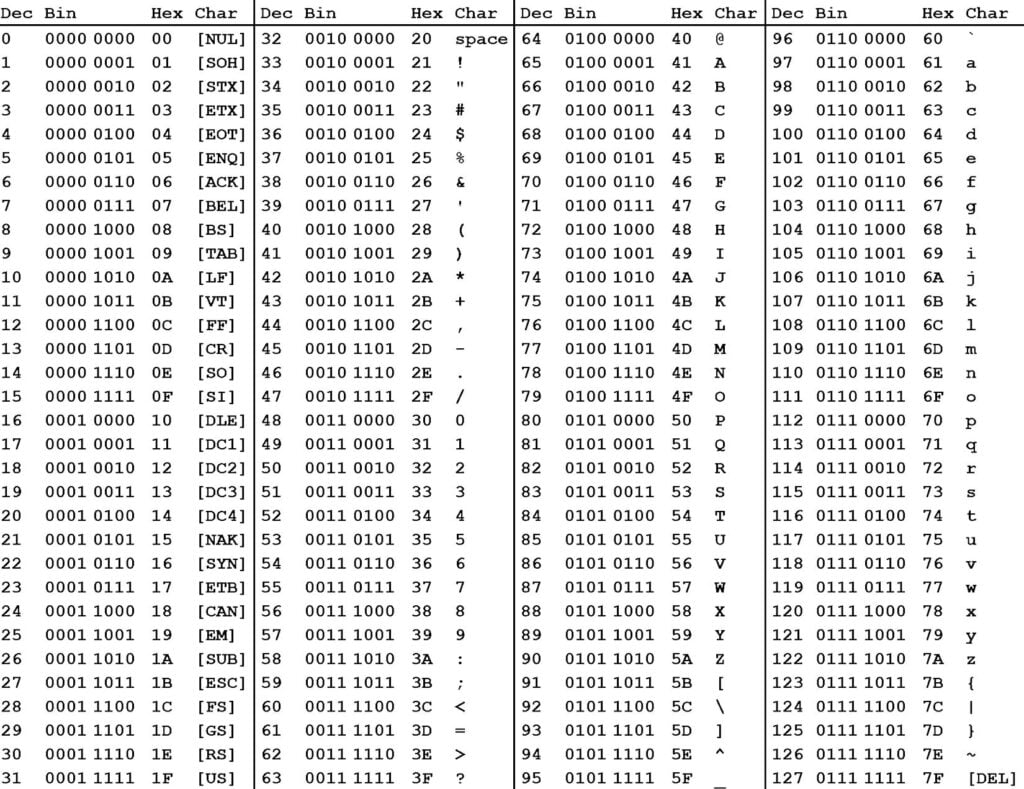
Here’s an example: The letter “A” might be represented by the binary code 01000001 in a computer. This is just a specific agreement between computers and programs about which combinations mean what.
For calculations, computers can perform addition, subtraction, and other operations by manipulating these 0s and 1s according to specific rules. It’s like a secret code for math too! Converting between binary and our regular number system takes practice, but there are binary translators and tricks to help.
What is A Binary Translator?
Imagine you have a walkie-talkie with a secret code. You can only speak in beeps and boops – one beep for “yes” and two beeps for “no.” Your friend has the same walkie-talkie and knows this code.
Binary code is kind of like that secret walkie-talkie language for computers. They use just 0s and 1s, like your beeps and boops. But we humans speak a different language, with numbers and letters.
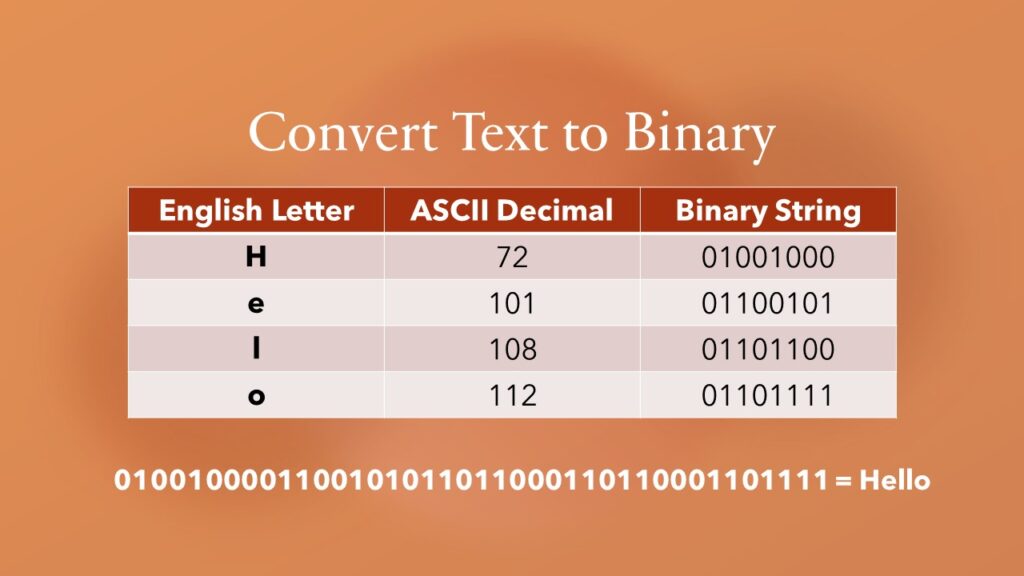
A binary translator is like a friend who knows both languages! It can take what you say in words and letters (like “show me a cat picture”) and turn it into beeps and boops (0s and 1s) that the computer understands. It can also take the computer’s beeps and boops and translate them back into words and pictures for you to see! So, it helps you chat with your computer buddy in a way you both understand.
If you want to understand the language or codes that a computer understands, you can be the translator. For that, you will have to memorize the ASCII table and other such encoding standards. But even if you memorize all the codes, it may take you a couple of seconds to decode every byte (8 bits or 8 beeps boops).
How Fast Your Computer Translates Binary Code?
You might find a chair to sit in when I reveal that your computer, laptop, or even smartphone does this task millions or even trillions of times every second. Yes, you heard right, the clock speed of your computer that you often heard of tells us the processing speed of one bit.
For example, if your laptop specs are 2GHz Octa Core then your computer can process 2000 x 8 = 16,000 million of 0s and 1s or beeps and boops in one second. That’s almost 2000 million characters or commands in one second.
Use Binary Translator For Learning
Memorizing ASCII code can be tough but memorizing all the encoding standards and commands can be impossible for you. But even if you memorize, you can’t match the processing speed of a computer manufactured in the early 70’s. But you can use binary translators to understand the code.
You can find desktop applications, mobile apps, and web versions of binary translators. Most of the time these are free, specifically designed for learning purposes. You can Google to find some binary translators. I’ve been using two such binary translators, both are free, fortunately.
An online binary translator is the best idea for learning binary code and its translation. If you use Traductor Binario, it has dual functions in one place. You can enter your message in any language and get it translated into Binary Code within a second or even less.
While there are two different Binary Translators on TextToolsOnline.com. One is for Text to Binary and the other is for Binary to Text Translator. The best thing about Binary Translator on Text Tools Online is that it gives you the option to translate in 7 Bits and 8 Bits – as per your choice. No other binary translator gives you that option.
Are There Any Real-Life Benefits of Binary Translators?
The short answer is: YES! Every digital device has a built-in binary translator. For example, you have a TV remote in your hand. You press the button “7” on your TV remote to switch to Channel 7. The TV remote translates this “7” signal into Binary Code. It becomes in the form of 0’s and 1’s. Now the TV remote throws light from the infrared LED that is on the front side of your TV remote. For 1, it will send a blink of light and for 0 it will delay making your TV understand that it’s ZERO. Once all the 7 or 8 bits are transferred, the TV processes that command and switch the channel.
So that was just an example from your routine life. Every day you are utilizing binary translators more than oxygen, but you don’t even realize it.
The End Words
You are using hundreds of devices daily and most of them are now digital and smart. But have you ever wondered how they work? They work on a very simple idea of ON and OFF. This ON state is termed as 1 and the OFF state is termed as 0 for understanding. This language of 0’s and 1’s that every digital device understands is Binary Code.
This ON and OFF is done millions of times every second. Every digital device has a built-in binary translator that converts binary code and fulfills our command. For understanding and learning, you can use an online binary translator. It will show you how computer or digital devices see your language or text.
References:
Natarajan, D. (2020). Number Systems and Binary Codes. Lecture Notes in Electrical Engineering. https://doi.org/10.1007/978-3-030-36196-9_5
O’Regan, G. (2018). Binary Number System. , 53-56. https://doi.org/10.1007/978-3-030-02619-6_12
Feaster, Y., Ali, F., & Hallstrom, J. (2012). Serious toys: teaching the binary number system. , 262-267. https://doi.org/10.1145/2325296.2325358
Hintze, G. (1966). Binary Numbers and Codes and Their Machine Representation. , 16-43. https://doi.org/10.1007/978-3-642-92912-0_2
Златопольский, Д., & Шилов, В. (2020). FROM THE HISTORY OF THE BINARY NUMBER SYSTEM. JUAN CARAMUEL. , 61-63. https://doi.org/10.32517/2221-1993-2020-19-8-61-63
Penney, W. (1965). A “Binary” System for Complex Numbers. J. ACM, 12, 247-248. https://doi.org/10.1145/321264.321274